tmux AI Agent Status Bar vs Sidebar: Working, Waiting, and Idle
Compare a tmux agent status bar with a sidebar. Show working, waiting, and idle state for Claude Code, Codex, and OpenCode without replacing your tmux layout.
Introduction
A tmux window can tell you that codex, claude, or opencode is still running. It cannot tell you whether the agent is writing code, waiting for approval, ready for another prompt, or stuck. Those are application states, not process states.
ClawTab adds that missing layer to the tmux status bar. A yellow ! means an agent needs input. A cyan * means recent work is in progress. A green ✓ means a supported agent is present but currently idle. The markers are derived from provider lifecycle events when available and conservative terminal observation when they are not.
The important caveat is simple: idle is not the same as finished. A quiet interactive agent may have completed its last turn, may be waiting for the next prompt, or may have stopped producing visible output while a subprocess continues. This guide compares the compact status-bar approach with a full tmux agent sidebar, explains what each marker proves, and shows how to test the result across Claude Code, Codex, and OpenCode.
The Status Bar Legend
ClawTab appends its markers to your existing tmux window format. It does not replace the theme or require a separate sidebar. The state is aggregated at the window level, so a window with several panes can show both attention and activity when different agents are doing different things.
Marker
Meaning
What it proves
What it does not prove
!
Waiting or asking
At least one detected agent pane has a visible question, approval, or provider attention event
That every pane in the window is blocked
*
Working
At least one pane has a working lifecycle state or recent meaningful terminal activity
That a particular task will succeed
✓
Present and idle
A supported agent is still present and is neither working nor asking
That the task is complete, correct, or ready to merge
No marker
No detected agent
ClawTab has no current agent record for that window
That the pane is empty; it may contain a shell, server, editor, or unsupported tool
For one pane, asking suppresses working because the blocked state is more useful. Across a multi-pane window, the status can show ! and * together: one pane needs you while another is still moving.
tmux Agent Status Bar or Sidebar?
A tmux agent sidebar dedicates a pane to a detailed session list. That is useful when you want per-agent previews, filters, Git state, worktree actions, or a tree spanning many sessions. A status bar uses the tmux window list you already have. It shows less detail, but it does not consume another pane or replace the current layout.
Need
Status bar
Agent sidebar
See which window needs attention
Compact marker beside the existing window name
Dedicated row for each tracked pane
Inspect prompts, Git, or worktree state
Open the pane or ClawTab dashboard
Can keep richer metadata visible in the sidebar
Preserve terminal space
No extra pane
Uses part of the tmux layout
Monitor from another device
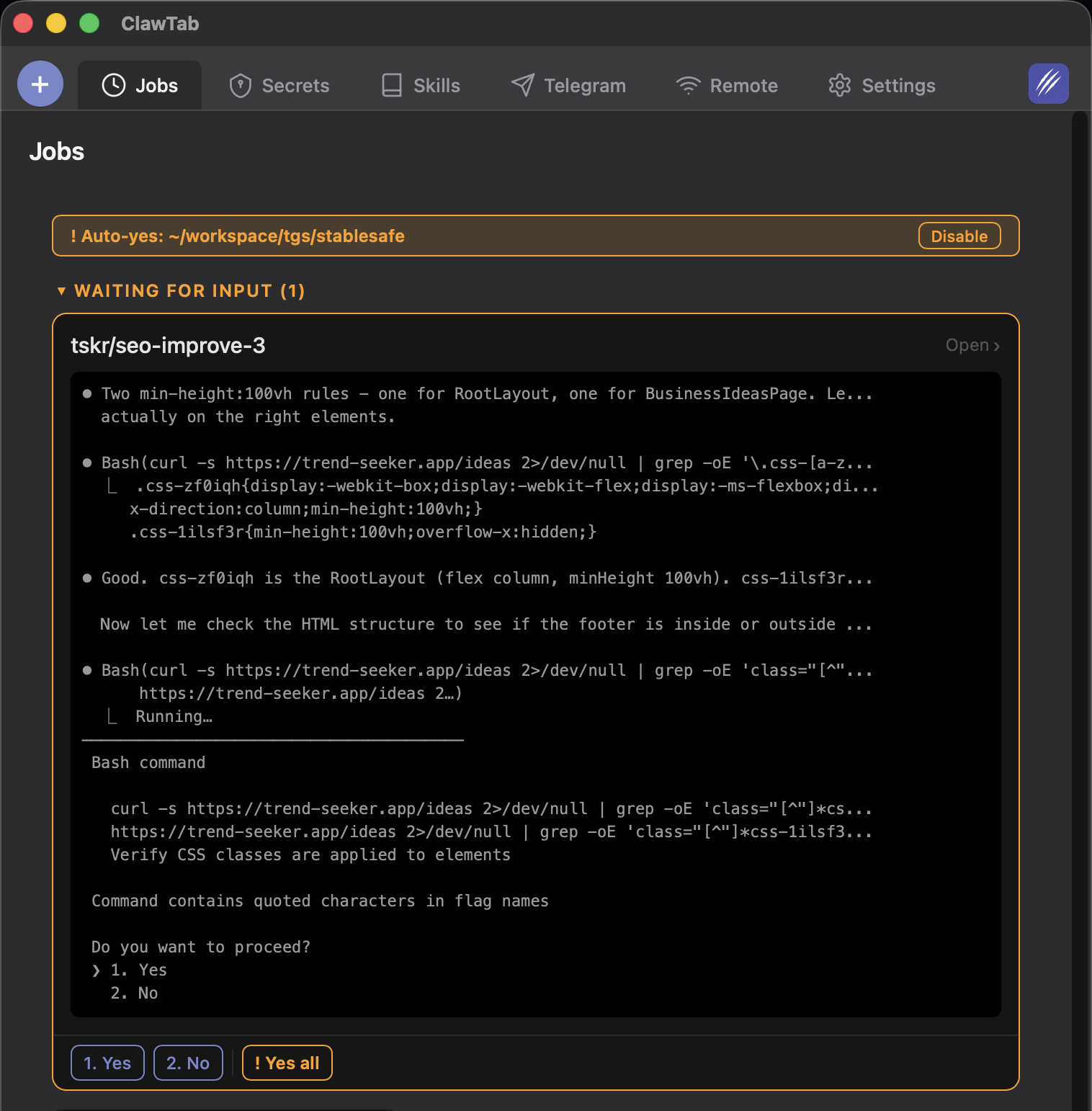
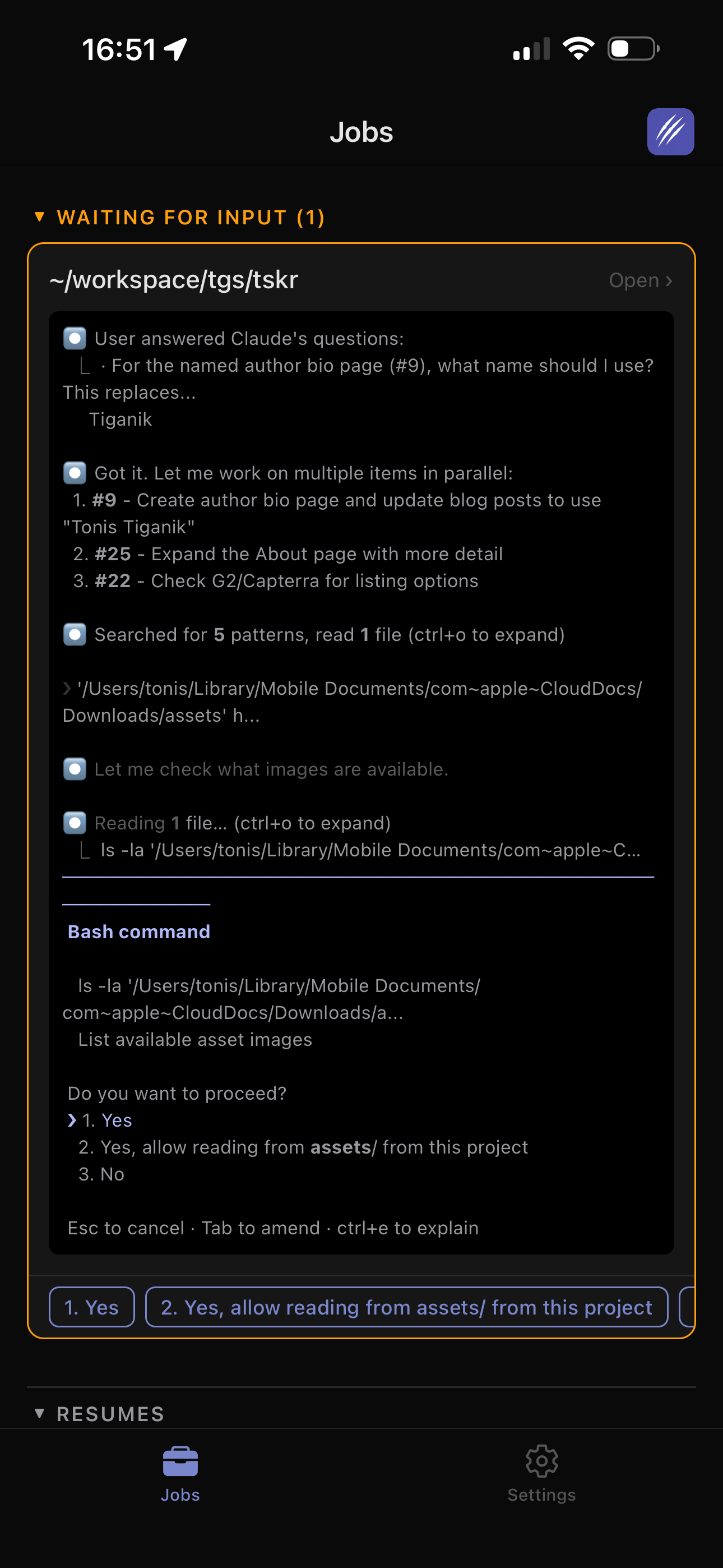
ClawTab projects the same pane state to desktop, web, and mobile
Depends on the sidebar and remote terminal setup
Work across Claude Code, Codex, and OpenCode
One marker format across supported agents
Depends on the sidebar's provider hooks and adapters
Use a sidebar when persistent detail inside tmux is the priority. Use ClawTab's status bar when you want a low-noise indicator and open the agent dashboard only when a marker needs investigation. Both approaches still need provider hooks or careful terminal detection; tmux alone cannot infer that an agent is waiting for approval.
Why tmux Cannot Detect Agent State by Itself
tmux keeps programs running after clients detach and exposes stable pane IDs, foreground commands, output capture, and custom options. Those primitives make it a good runtime for coding agents. They do not give tmux a definition of “waiting for approval.”
A foreground PID is especially weak evidence. An interactive agent remains alive after it finishes a turn. A child process may keep running after the agent stops printing. A spinner may repaint the same text without adding scrollback. Resizing a pane can reflow every visible line even though the agent did no work.
ClawTab therefore uses a layered signal path:
Provider events first. Claude Code, Codex, and OpenCode expose lifecycle or attention events that can identify submitted prompts, permission requests, completed turns, and idle sessions.
Terminal parsing for visible questions. The daemon examines the live pane for approval choices and interactive prompts, including cases where a provider event is missing or delayed.
Activity fallback. When no hook-backed state is available, the daemon compares normalized pane history and visible output over time.
tmux projection. A listener maps the resulting pane states into tmux custom options and refreshes the window markers.
This division matters. tmux preserves the terminal. Provider hooks add semantics. Terminal observation covers gaps. The status bar only presents the result.
How Working Detection Avoids Obvious False Positives
The terminal fallback marks a pane as working for an eight-second recent-activity window. It compares normalized scrollback, history size, pane dimensions, and the currently visible terminal. Several filters make the signal less noisy:
ANSI formatting is stripped before text history is compared.
A layout change clears the activity timestamp instead of treating reflow as new work.
Echoed input is excluded, so typing a prompt does not by itself count as agent output.
A repeated color-only change can count as activity, which covers full-screen interfaces whose spinner repaints without adding lines.
One color change is not enough. The detector waits for a repeated pattern to avoid classifying a single redraw as work.
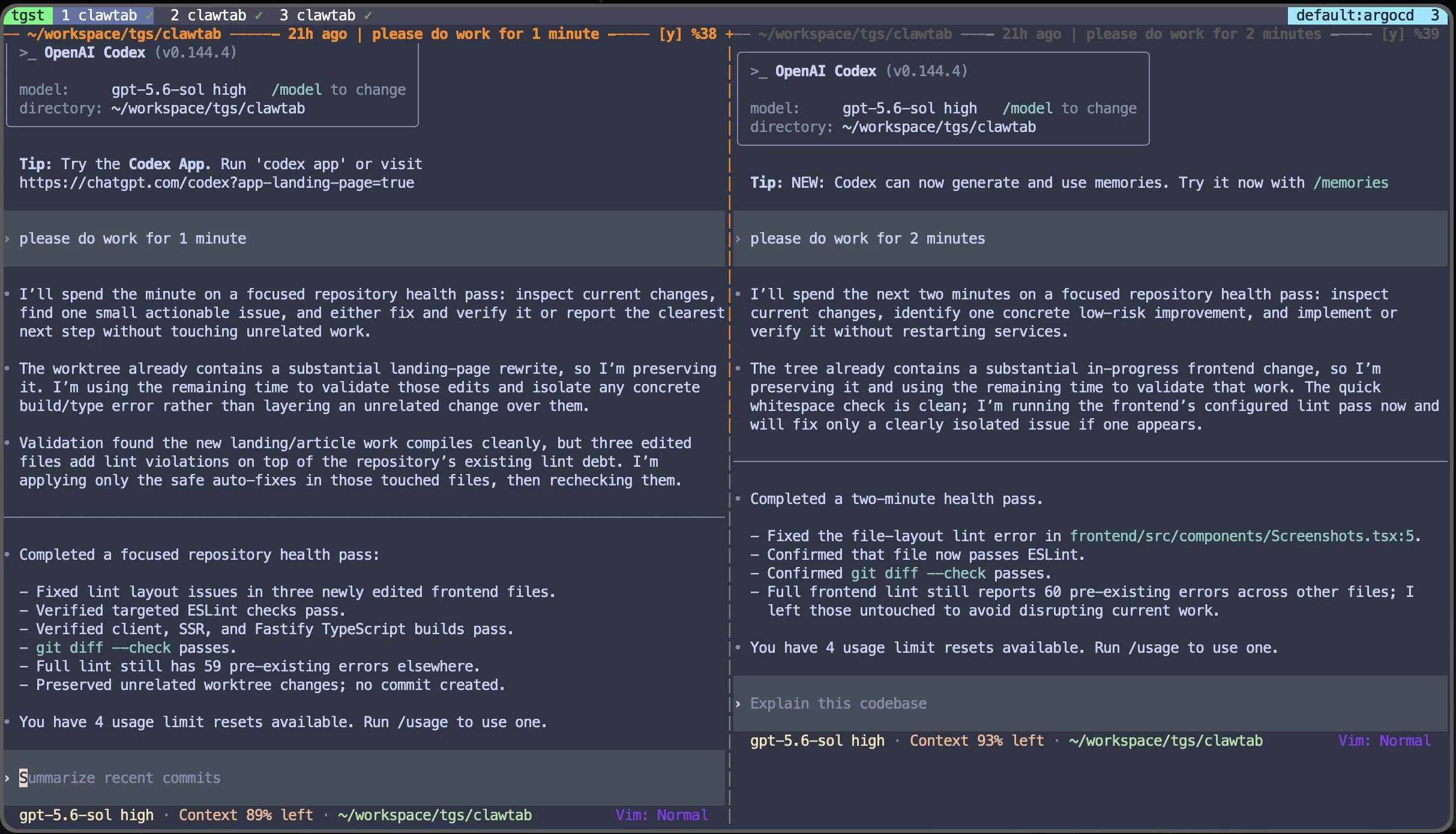
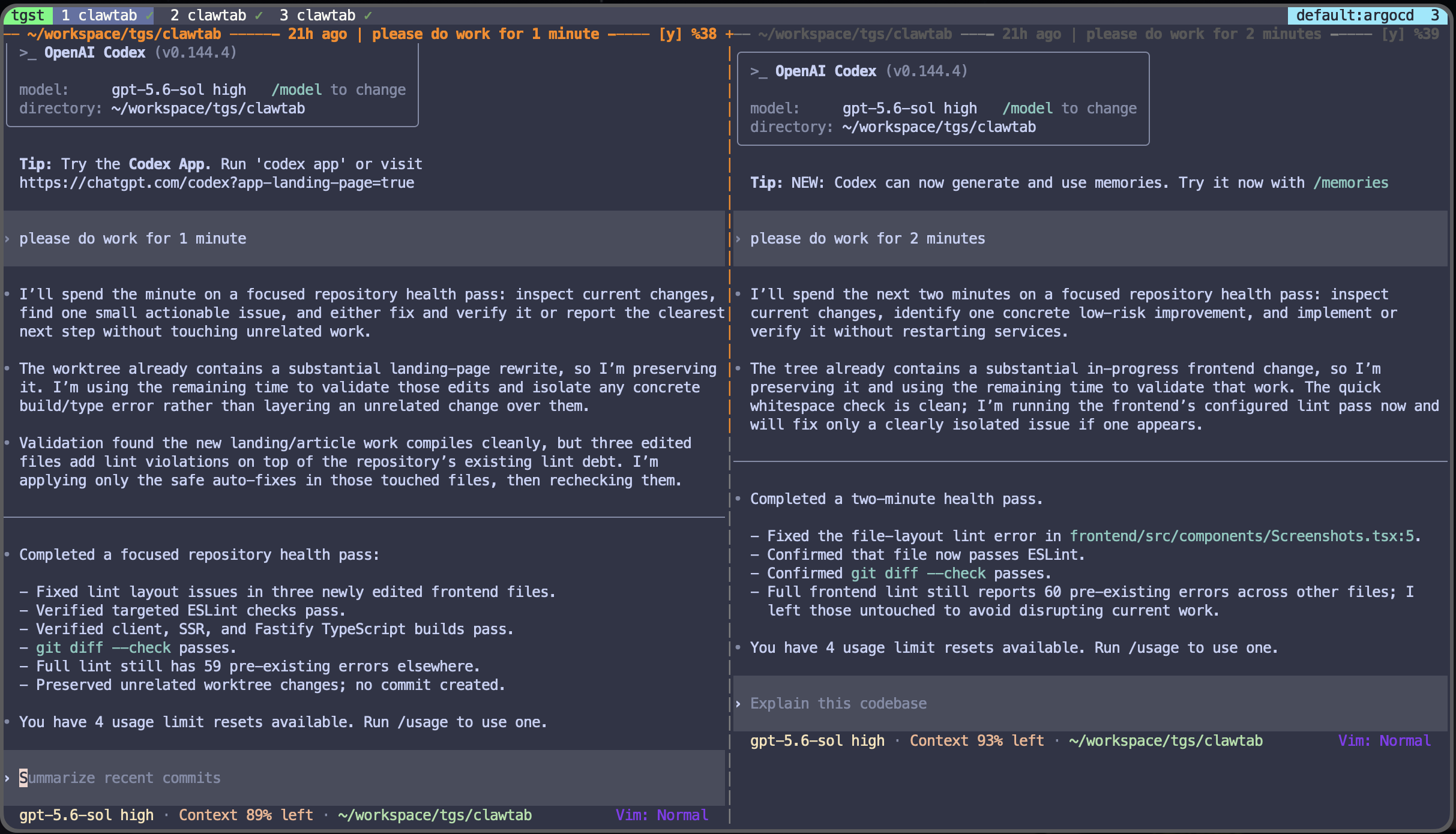
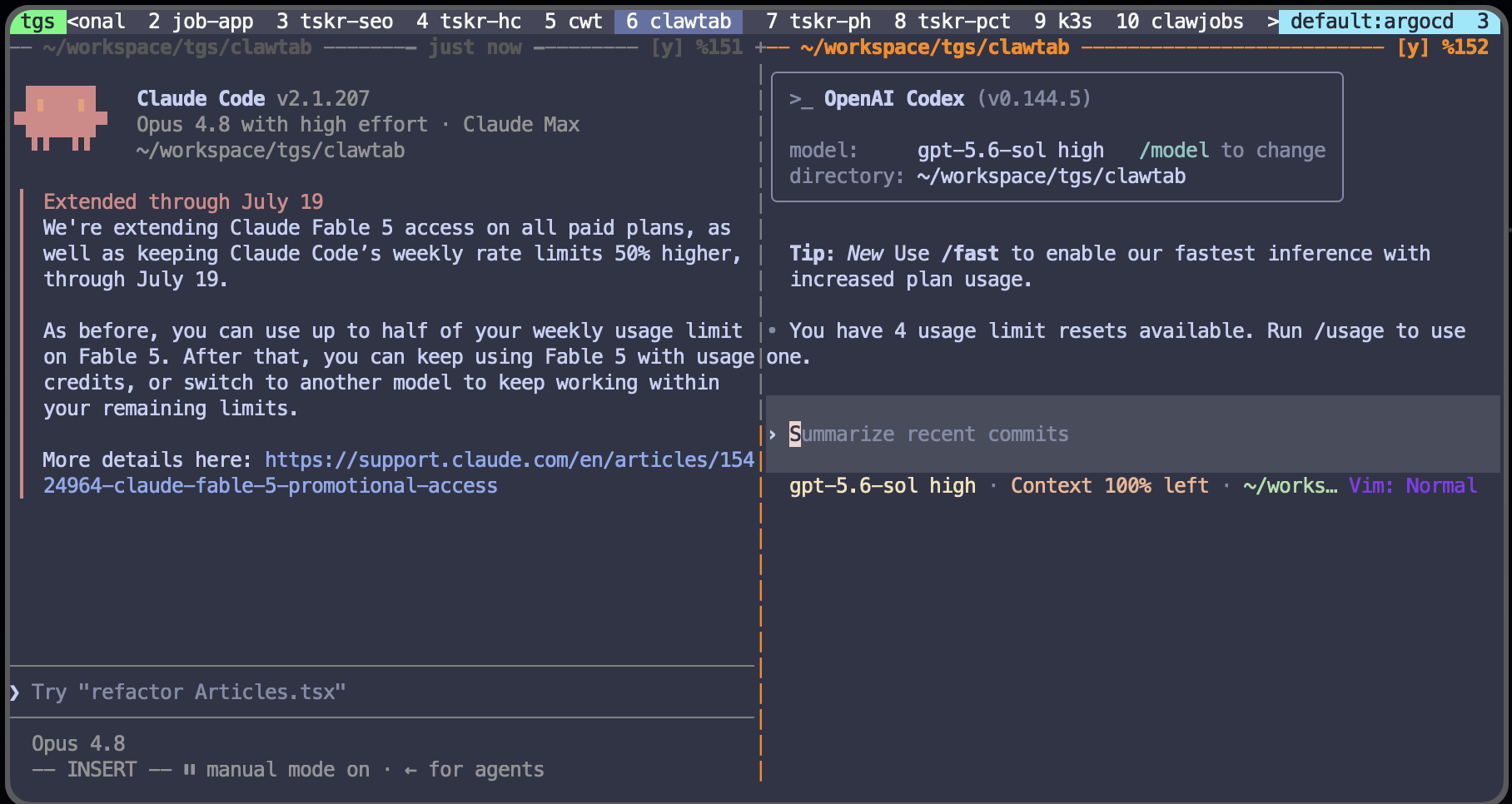
The screenshot below shows two Codex panes running at the same time. The useful signal is not simply that both processes exist. It is whether each pane is emitting lifecycle or terminal activity now.
Two real Codex panes in one tmux window. The capture demonstrates concurrent terminal sessions; it is not a performance benchmark and the status markers describe the moment shown.
How Waiting and Approval Detection Works
Waiting deserves higher priority than working because it is the state that costs the most time when you miss it. ClawTab combines provider attention events with terminal question detection. If the pane still shows a permission prompt, the window gets a yellow ! and tmux can prefer that pane when you enter the window.
Terminal parsing remains useful even with hooks. A provider can emit a permission event without emitting a symmetrical “resolved” event at the moment a tool continues. ClawTab lets the visible prompt decide whether the pane is still asking, then treats the provider state as working until the next idle or stop event.
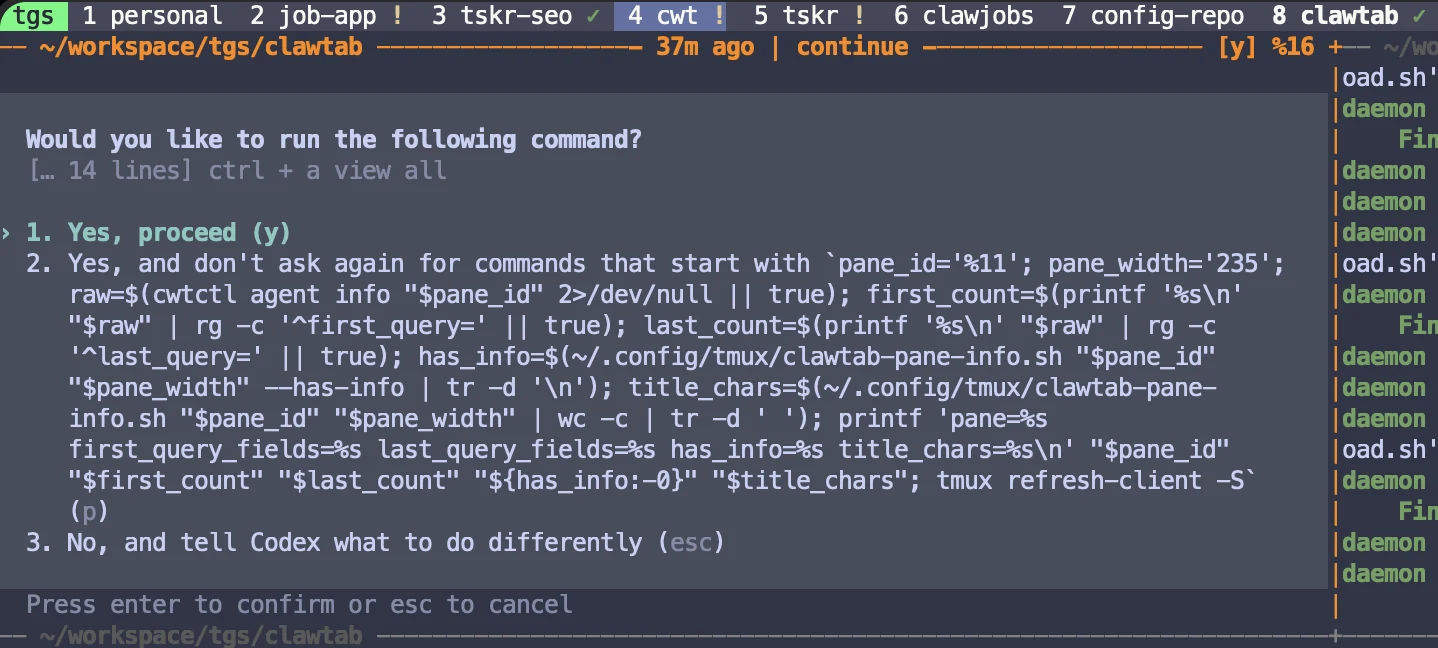
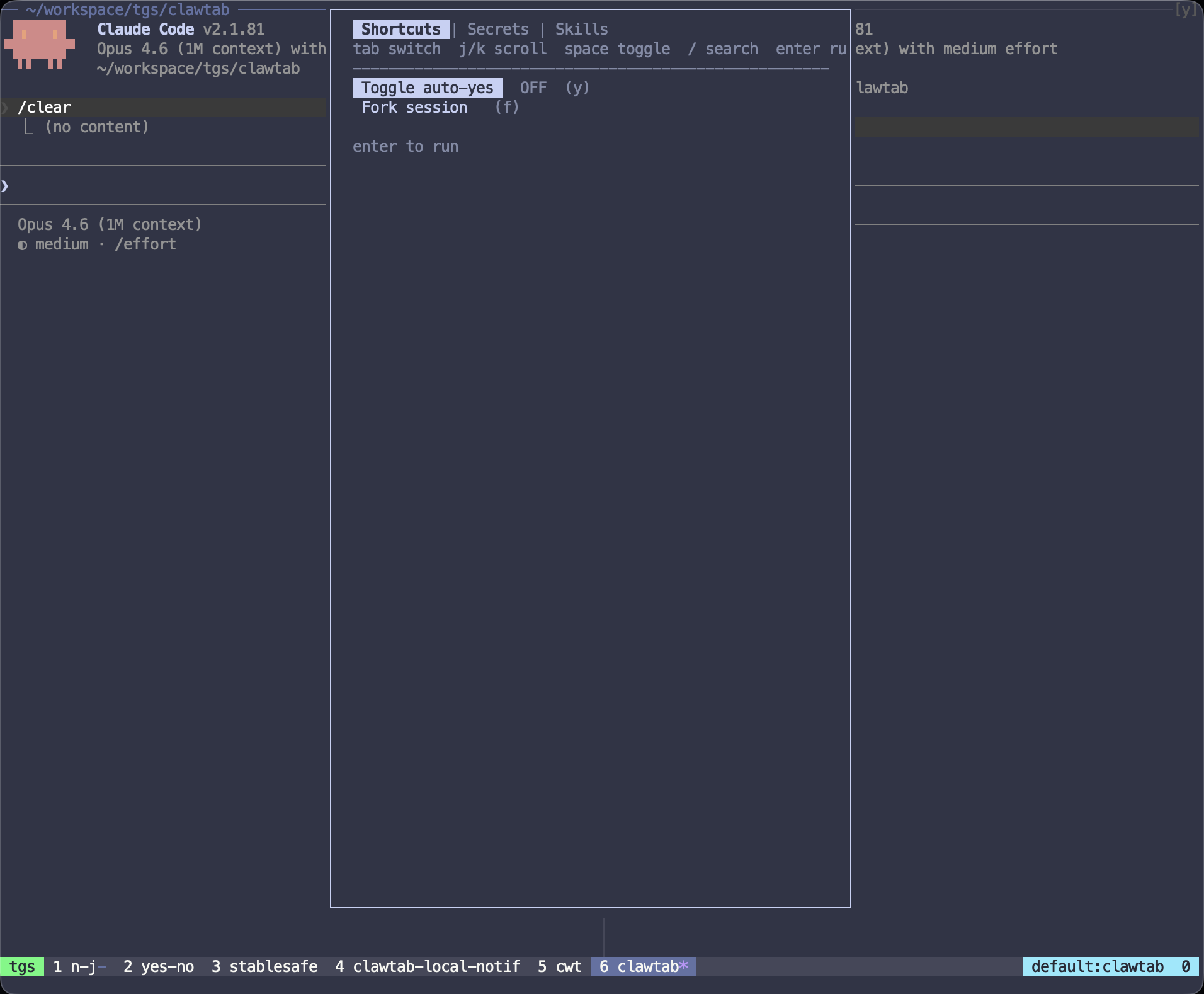
A real Codex approval prompt and the corresponding yellow attention markers. Terminal parsing confirms that the question is still visible; prompt wording can change between provider versions.
Provider Compatibility as of August 21, 2026
The matrix below describes the signals used by the current ClawTab implementation. “Fallback” means ClawTab can still infer recent activity and visible questions from the terminal when provider hooks are unavailable. It does not mean every future prompt format will parse perfectly.
Pane type
Lifecycle signal
Attention signal
Terminal fallback
Idle or done interpretation
Claude Code
Session start, prompt submit, stop, session end
Permission request, question tool, idle and permission notifications
Yes
Stop means the response ended; it does not certify the requested task
Codex CLI
Session start, prompt submit, stop
Permission request plus visible prompt parsing
Yes
Stop or turn completion means the turn ended, not that tests passed
session.idle means ready for input; deletion means the tracked session ended
Ordinary shell
None
None
No agent marker
Shell process state is not presented as agent completion
Hook support changes faster than tmux itself. Use the provider row as a tested boundary for this dated implementation, not as a permanent promise about third-party event schemas.
From Agent Event to tmux Window Marker
The state path stays local and pane-addressed:
The ClawTab daemon discovers supported agent processes and associates them with stable tmux pane IDs.
Provider hooks write small lifecycle events to a private local inbox. The question detector separately checks visible prompts and terminal activity.
The daemon resolves each pane to two booleans: working and asking. A detected pane with both false is present and idle.
The daemon publishes complete activity snapshots over a local Unix event socket.
The tmux listener aggregates pane state by window and updates @clawtab-agent-present, @clawtab-agent-working, and @clawtab-agent-question.
The plugin appends !, *, or ✓ to the existing window-status-format and window-status-current-format.
Events carry session identity and state, not terminal transcripts or tool inputs. The full terminal remains in tmux. If the daemon briefly reconnects, the listener retains its last good snapshot instead of making every marker flicker away immediately.
Set Up tmux Agent Status
The status path needs tmux, the ClawTab daemon and cwtctl, the ClawTab tmux plugin, jq, and a Unix-socket-capable nc. On macOS, the last item is already available. Follow the full tmux plugin installation guide if the plugin is not loaded yet.
Check
Command
Expected result
Daemon
cwtctl daemon status
The local daemon reports that it is running
Plugin dependencies
command -v cwtctl jq nc
Each command prints a path
Provider hooks
cwtctl agent hooks status claude
Lifecycle and attention capabilities are configured
Install or repair hooks
cwtctl agent hooks install codex
The selected provider reports a successful install
Reload plugin
tmux source-file ~/.tmux.conf
The status listener is replaced and current formats are updated
Repeat the hook status or install command with claude, codex, or opencode. ClawTab preserves unrelated hook entries and only manages its own installed groups or plugin file.
Use Task Titles With Status Markers
A status icon answers “does this pane need me?” It does not answer “which task is this?” Pane titles close that gap. ClawTab can read the first and latest query for a provider session, then store a concise display name as tmux pane metadata.
That makes a long status line useful at a glance: the title identifies the task, * shows movement, ! shows a blocker, and ✓ shows a quiet agent. When the agent exits and the pane returns to an ordinary shell, the listener clears the agent-specific title instead of attaching stale context to the next process.
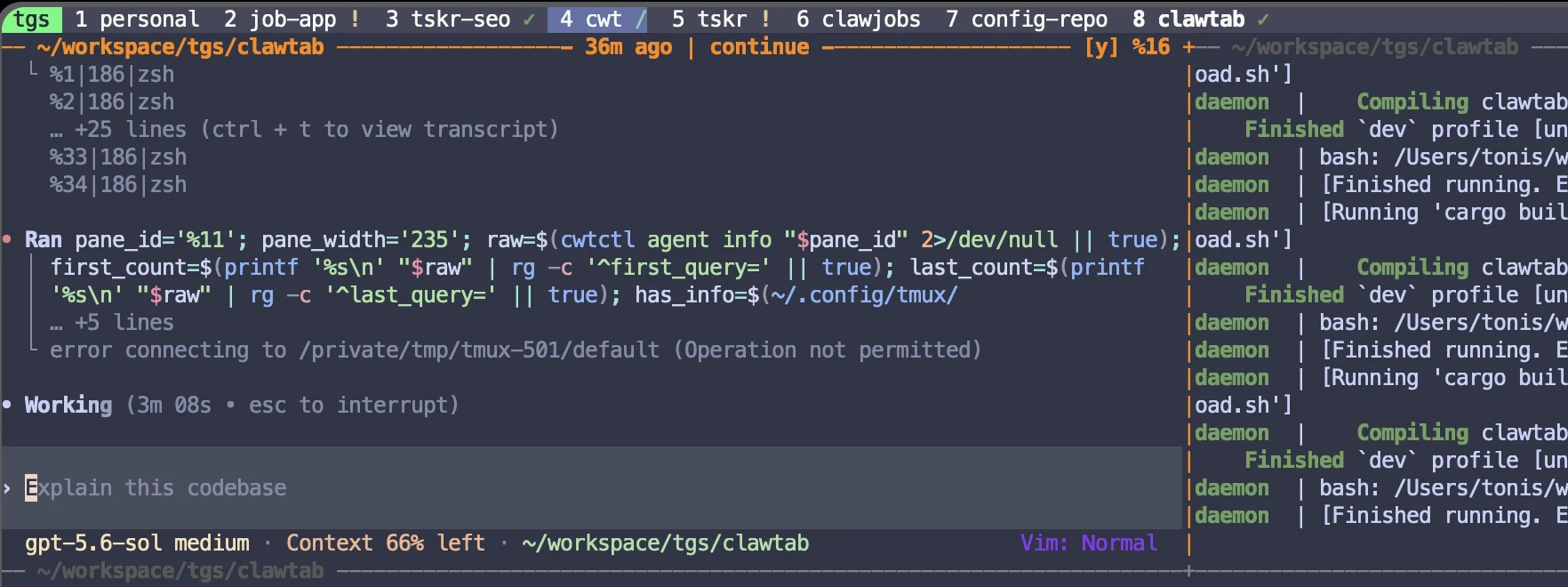
A real task-aware tmux pane title beside an approval state. The title is a generated summary of session queries, so it helps navigation but is not a source of completion truth.
Idle, Finished, Failed, and Stuck Are Different States
The green check is intentionally conservative. It means “agent present, no current work or question detected.” It should not be read as “done.”
State you care about
Best evidence
Why the status bar alone is insufficient
Turn finished
Provider stop, completion, or idle event
A turn can finish while the larger task remains incomplete
Job completed
Tracked job exit plus run history
An interactive agent normally stays alive between turns
Task verified
Tests, checks, diff review, and explicit acceptance criteria
Terminal silence says nothing about correctness
Agent stuck
Elapsed time, unchanged state, process inspection, and task context
A long-running command can be healthy while producing no output
Agent failed
Provider error event, process exit, or captured error output
Some failures return to an idle prompt instead of exiting
For unattended jobs, use ClawTab's run history and completion notifications. For interactive sessions, treat the status bar as a routing tool: it tells you where to look next, not whether to merge.
A Small Test That Catches Most Status Problems
Test the status system with behavior you can observe, not a synthetic spinner:
Open two supported agents in separate tmux panes and confirm both windows receive a marker.
Give one agent a task that produces terminal output for at least ten seconds. Its window should show *, then settle to ✓ after the turn becomes idle.
Force an approval request in the other pane. Its window should show !, and entering that window should prefer the asking pane.
Resize the terminal without running anything. A layout reflow should not create a sustained working marker.
Detach and reattach tmux. The processes, pane IDs, titles, and status should remain connected.
Exit one agent back to a shell. Its agent marker and generated task title should clear.
If provider hooks fail, the terminal fallback should still catch visible output and common permission prompts. If the provider changes its event schema or prompt UI, hook status and terminal parsing are the first two places to inspect.
tmux cannot understand agent state by itself, but ClawTab can project provider lifecycle events and recent terminal activity into tmux custom options. Its plugin shows a cyan star for working, a yellow exclamation mark for waiting, and a green check for a detected but idle agent.
Use a status bar when you only need compact working, waiting, and idle markers beside existing tmux windows. Use an agent sidebar when you want persistent per-pane previews, filters, Git state, or worktree actions inside tmux. ClawTab keeps the status bar compact and provides richer details in its desktop, web, and mobile dashboards.
It means a supported agent is present and is neither working nor asking for input. It does not prove that the requested task is complete, tests passed, or the changes are ready to merge.
ClawTab combines provider attention events with terminal parsing for visible questions and approval choices. Asking takes priority over working for the same pane, so a blocked agent gets the yellow attention marker.
Yes. ClawTab has lifecycle and attention integrations for Claude Code, Codex, and OpenCode, plus a conservative terminal fallback. Provider event schemas can change, so the compatibility matrix in this article is dated August 21, 2026.
The terminal fallback uses recent meaningful output, not process existence. A healthy command that produces no new terminal activity can look idle. Provider lifecycle hooks improve this, but silent subprocesses still require process or job-level inspection.
It can show that a provider turn stopped or became idle, but completion requires stronger evidence. Use job exit status, run history, tests, checks, and explicit acceptance criteria before treating work as finished.