Introduction
If you run many AI coding agents in tmux, restoring the pane layout is only half the problem. tmux-resurrect can bring back windows, panes, paths, and shell commands, but it usually does not know which agent conversation belonged to each pane.
That matters when you have 10 Codex instances, 5 Claude Code sessions, and a few OpenCode panes running at the same time. Restoring a pane with codex is not enough. You want the exact conversation restored with codex resume <session-id>. Same for claude -r <session-id> and opencode -s <session-id>.
This guide explains the difference between tmux process restore and agent session restore, then shows the ClawTab approach: track the pane id, resolve the agent session id, and save a restore command that tmux can run after restart.
Layout State Is Not Conversation State
A normal tmux restore answers the terminal question: which windows existed, how panes were split, which directory each pane used, and which command should be started again. AI coding agents need a second answer: which conversation id should that command resume?
The right restore command depends on the provider. Claude Code, Codex, and OpenCode all have their own resume syntax, and each pane needs its own id. A workspace with many parallel agents cannot safely use one generic command for all of them.
| Tool | Generic command | Exact restore command | What must be saved |
|---|---|---|---|
| Claude Code | claude | claude -r <session-id> | Claude session id |
| Codex | codex | codex resume <session-id> | Codex thread id |
| OpenCode | opencode | opencode -s <session-id> | OpenCode session id |
Without that fourth column, tmux can reopen terminals but cannot know which conversation should appear in each one. The rest of the setup is about filling in that missing id before the restore file is saved.
Why tmux-resurrect Alone Is Not Enough
tmux tracks panes, windows, working directories, and foreground processes. tmux-resurrect serializes that state into a text file and replays it later. That is excellent for shells, editors, REPLs, and simple long-running processes.
AI coding agents add another layer. The visible terminal process is only the launcher. The useful state is the agent conversation id stored in the provider's own local data. If tmux saves this:
pane my-session 0 1 :/Users/me/app 1 :codexthen a restore can start Codex again, but Codex may open a new conversation. For a single agent, you can fix that manually. For a workspace with dozens of running agents, manual recovery becomes error-prone because every pane needs a different id.
The restore file needs to be rewritten before it is considered complete:
pane my-session 0 1 :/Users/me/app 1 :codex resume 019e7743-2a2e-7e20-b9b1-57cfd501da30That one line is the difference between "Codex starts" and "the right Codex session comes back".
How ClawTab Tracks the Missing Session Id
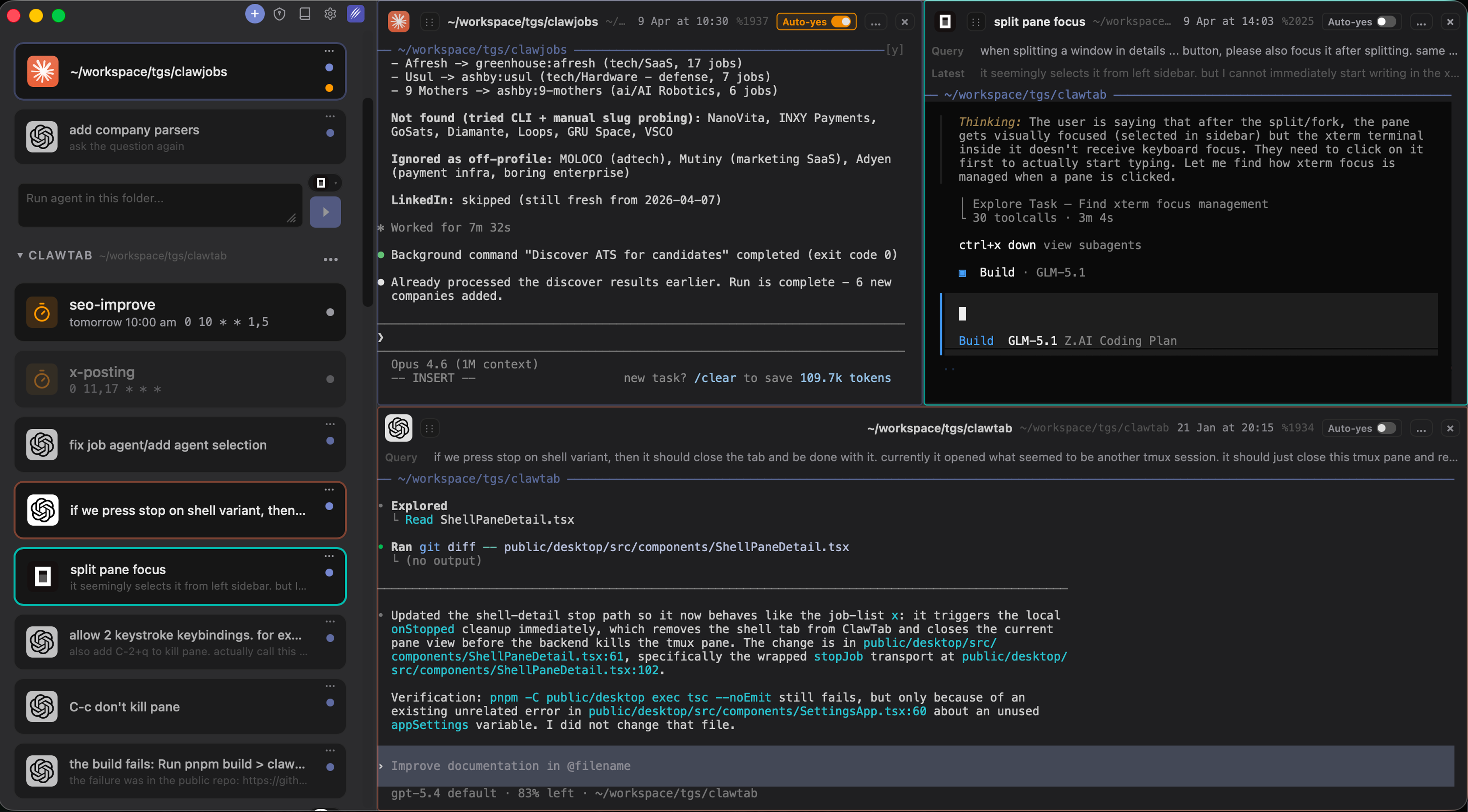
ClawTab v0.3 added native support for Claude Code, Codex, and OpenCode in the same pane list. Each running pane is monitored as a job with metadata: provider, pane id, first query, last query, start time, and when available, the provider session id.
That means ClawTab can answer a tmux-specific question:
cwtctl pane-info restore-command %285Instead of returning a generic provider command, ClawTab returns the command that resumes the exact conversation attached to that pane:
codex resume 019e7743-2a2e-7e20-b9b1-57cfd501da30The same mechanism works for other providers:
| Detected pane | ClawTab restore command |
|---|---|
| Claude Code pane with session id | claude -r <session-id> |
| Codex pane with thread id | codex resume <thread-id> |
| OpenCode pane with session id | opencode -s <session-id> |
For day-to-day use you do not need to remember where each provider stores its history. ClawTab is already watching the tmux panes, so the CLI can expose the restore command as a small, scriptable primitive.
The tmux-resurrect Hook Pattern
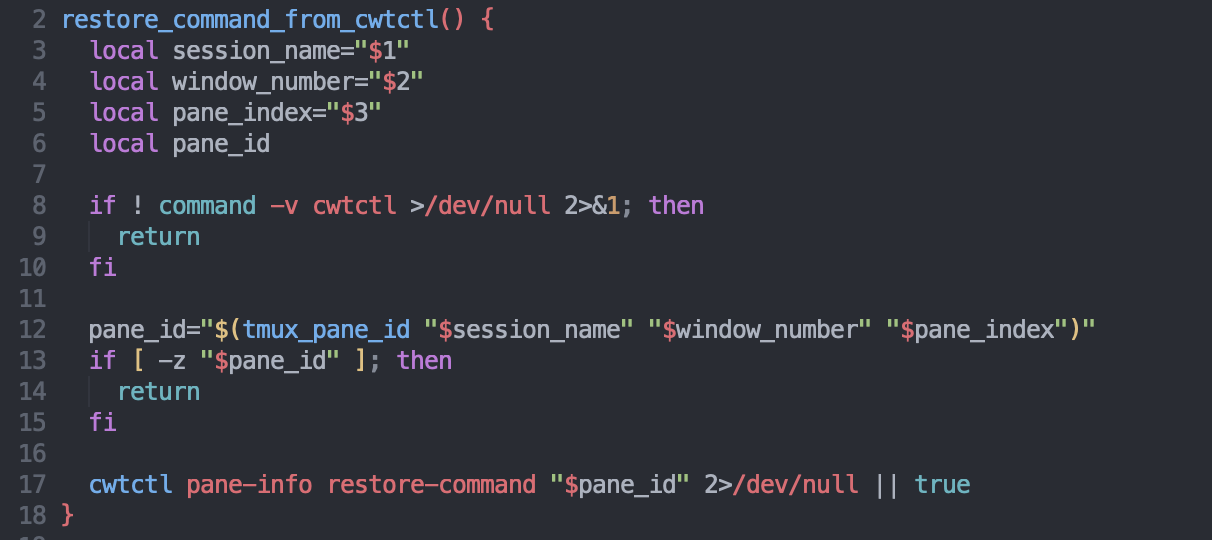
The practical setup is a post-save hook. tmux-resurrect writes its normal state file first. Then a small script walks through every saved pane line, resolves the live tmux pane id, asks ClawTab for an exact restore command, and replaces generic agent commands when a session id is available.
# ~/.tmux.conf
set -g @resurrect-hook-post-save-layout '~/.config/tmux/save-agent-session-ids.sh'

set -g @resurrect-processes 'claude codex opencode'
The hook script can call ClawTab first:
restore_command="$(cwtctl pane-info restore-command "$pane_id" 2>/dev/null || true)"

if [ -n "$restore_command" ]; then
  # Replace the saved pane command with the exact provider resume command.
  command="$restore_command"
fi
That keeps tmux-resurrect responsible for the terminal layout and lets ClawTab provide the session-aware provider command. The resulting restore file is still plain tmux-resurrect state; it just contains better commands.
If ClawTab cannot find a session id for a pane, the hook should leave the original command unchanged. That makes the setup safe to use with regular shells, editors, and agent panes that were not detected yet.
What a Verified Restore Save Looks Like
A good saved state should contain provider resume commands, not bare provider launchers. After saving tmux-resurrect, inspect the latest restore file:
rg 'codex resume|claude -r|opencode -s' ~/.local/share/tmux/resurrect/lastFor a multi-agent Codex workspace, you should see separate session ids per pane:
codex resume 019e6b92-e0fd-75b2-b677-9cf33a30f081
codex resume 019e75b4-dc1d-7ed2-81c9-c11059a0cb2e
codex resume 019e7743-2a2e-7e20-b9b1-57cfd501da30
You can also check that no bare agent commands were left behind:
rg -P '\t:codex($| (?!resume))|\t:claude($| (?!-r))|\t:opencode($| (?!-s))' ~/.local/share/tmux/resurrect/lastIf that second command prints nothing, the saved file is ready for a tmux restart. tmux-resurrect will recreate panes and run the exact resume commands instead of starting fresh conversations.
Manual Recovery Without Automation
If you do not want to wire up the post-save hook yet, you can still use ClawTab as a manual recovery tool. Ask for the pane's restore command before shutting down tmux:
tmux list-panes -a -F '#{pane_id} #{pane_current_command} #{pane_current_path}'
cwtctl pane-info restore-command %285
Then save the output somewhere in your notes or a shell script. After restarting tmux, open a pane in the same project directory and run the command:
codex resume 019e7743-2a2e-7e20-b9b1-57cfd501da30This is less convenient than a hook, but it is useful while validating provider support. It also gives you a direct debugging path: if cwtctl pane-info restore-command returns "No restore command found", ClawTab has not associated a session id with that pane yet.
Recommended Setup
For a serious multi-agent tmux workflow, use the layered approach:
- tmux keeps panes and windows alive.
- tmux-resurrect saves and restores the terminal layout.
- ClawTab tracks pane metadata and provider session ids.
- A post-save hook rewrites bare provider commands into exact resume commands.
This gives you a restore path that scales with the number of agents. One Claude Code pane, ten Codex panes, and three OpenCode panes can all come back to their own conversations after a restart.
ClawTab still handles the rest of the operational layer: per-pane auto-yes, remote monitoring, notifications, and parallel agent swarms. Session restore completes the loop: if tmux dies or your Mac restarts, the workspace can be recreated with the right conversations attached to the right panes.