Cheap Compact: Change Models for Codex Compaction, Then Switch Back
A practical ClawTab guide to temporarily selecting a compaction model, running /compact, and restoring your working model and unfinished draft.
Introduction
Cheap Compact is an optional local ClawTab plugin for a small recurring workflow: preserve the draft, select a temporary model, submit Codex's /compact command, then restore the original model, reasoning effort, and draft.
The example package uses gpt-5.6-luna with low effort for the temporary selection. The name describes its intent. This guide does not claim a measured cost reduction: the account's billing rules, the compaction path, cache behavior, and quality of the resulting summary all matter.
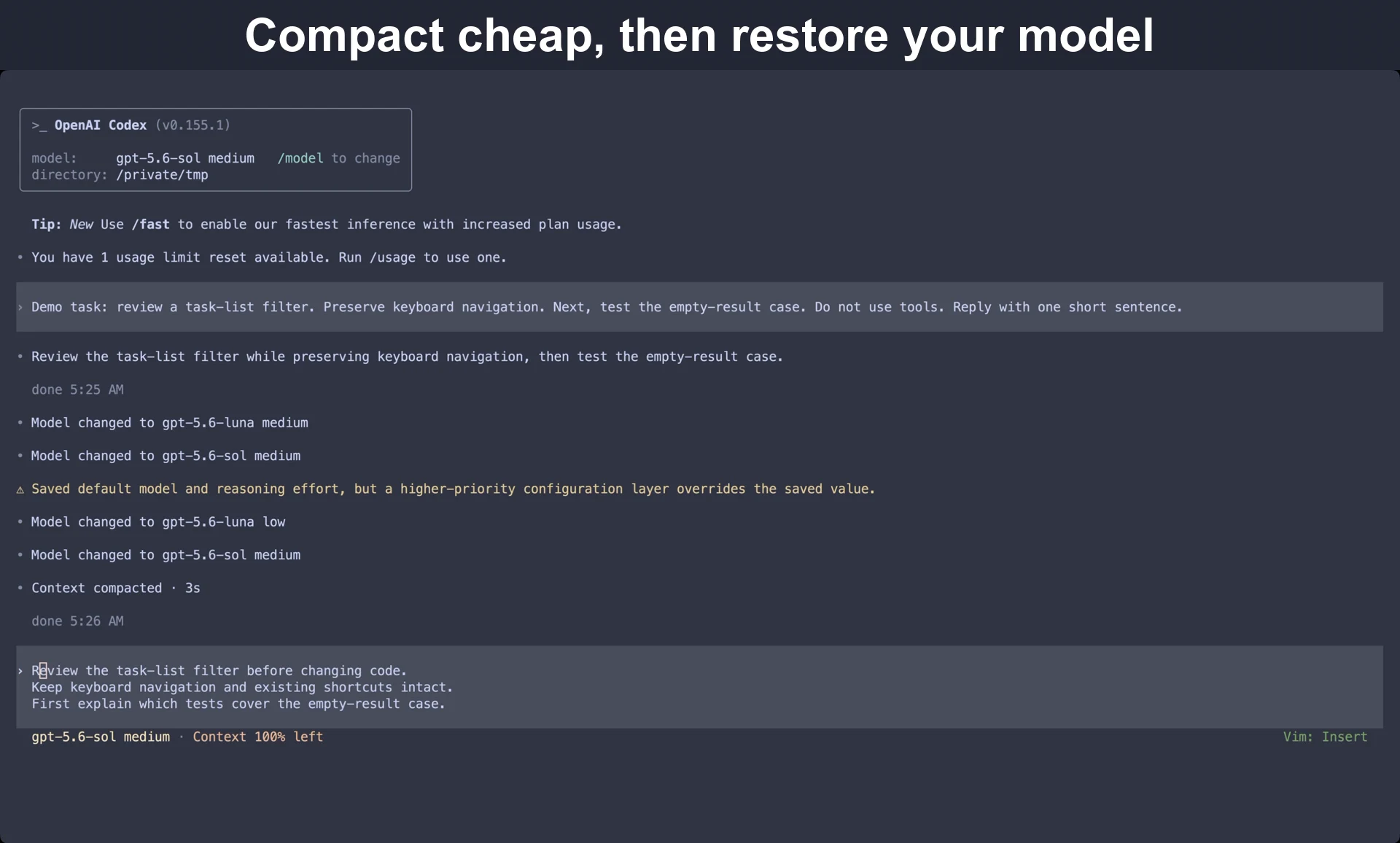
The video shows the temporary model switch, compaction, and return to the original model with the draft intact.
Separate the working model from the maintenance action
The model you choose for a difficult coding task need not be the model you would choose for summarizing the conversation. That is the distinction behind Codex issue #22486, which requests independently configurable compaction model and effort settings. The request is open as checked on September 21, 2026.
Cheap Compact automates a manual sequence in the current session. It does not add the proposed native configuration, replace Codex's summarizer, or change which model Codex uses for every automatic compaction. You trigger it deliberately when you want this workflow.
Stage
What the example does
What to inspect
Preserve
Stash the unfinished composer draft
Your prompt remains unsubmitted
Select
Choose Luna with low effort
The temporary model selection succeeds
Compact
Submit /compact
Codex's own compaction output
Return
Restore the baseline model and effort, then the draft
The working model and complete draft are back
The table describes the plugin's control flow. It is not evidence of which model a remote service ultimately billed for the compaction request. Check provider telemetry if you need that assurance.
Install the small local package
You need ClawTab's daemon and cwt, a Codex session running in tmux, and access to the temporary model. Download the example Cheap Compact package. The archive contains local.cheap-compact/plugin.yaml and local.cheap-compact/run.sh.
Extract it under ~/.config/clawtab/agent-plugins/. Read the manifest and script before approving it, and make run.sh executable. The script's compact_model and compact_effort variables are the settings to change if you want another supported pair.
Local plugins are trusted executables with your user's permissions, not sandboxed extensions. ClawTab approval is tied to a fingerprint; changing the package requires reviewing and approving the new fingerprint. Packages are discovered without restarting the daemon. See the plugin package documentation for the full format.
cwt plugin installed --json
# Use the fingerprint reported for the package you reviewed.
cwt plugin approve local.cheap-compact <reviewed-fingerprint>
cwt plugin list %54 --json
Run it at a natural pause in the task
A useful moment is after an investigation has produced a clear conclusion and before you begin the next phase. For example, you have narrowed a failing task-list filter to one condition and are about to ask for a patch. Keep the next prompt in the composer, then run Cheap Compact.
Wait for the current turn to finish and identify the correct Codex pane.
Write down any essential decision, constraint, or test result that should survive in a project note.
In the local Hammerspoon setup, press Option-L and choose cheap compact. Alternatively, run the CLI action below from another shell.
Poll the returned run ID and inspect the Codex terminal.
Confirm the original model, effort, and draft are restored. Check the compacted session still has the information needed for the next step.
Replace %54 with your own target pane. Option-L is our local binding, not a default installed by ClawTab.
cwt plugin local.cheap-compact.compact run %54
cwt plugin local.cheap-compact.compact status <run-id>
Started, restored, and compacted are different observations
The run command returns a record immediately. It does not wait for the complete workflow. That is why the local shortcut says Cheap compact started when the launch succeeds. Use the status command for progress and errors.
The example script submits /compact, waits one second, then requests restoration of the baseline model and draft. It does not independently evaluate the summary or verify a billing record. Even the script's compacted: true result is a plugin result, not a separate measurement of summary quality.
The final frame below shows Codex reporting that compaction completed, with the original model and draft restored. Watch Codex for that actual compaction result. If the action fails or the terminal is still busy, inspect it before retrying. Avoid editing the composer during the sequence. If you only want to change models, use the simpler draft-preserving model switch.
Compaction has completed. The original model, effort, and draft are restored.
Judge the whole continuation, not just the temporary model
Codex documents /compact as a way to summarize the conversation and free context in its command reference. A smaller summary is useful only if the next turn can still do the job.
Question after compaction
Useful evidence
Did the working configuration return?
Original model and effort in the terminal
Did the draft survive?
All lines and constraints remain unsubmitted
Did task state survive?
The next turn remembers the goal, decisions, and unresolved check
Was it cheaper overall?
Actual usage, including compaction and subsequent turns
For the task-list example, the key continuation check is whether the agent still knows to preserve keyboard navigation and test filtering. If it must repeat the investigation, a cheaper individual request may not have improved the overall workflow.
OpenCode issue #16512 reports loss of constraints and debugging details after compaction. It is closed as not planned as checked on September 21, 2026. That report is a useful reason to test continuation quality; it is not a benchmark for this plugin.
The same request appears in OpenCode and Claude Code
These issues describe related needs in their respective versions. They are context for the workflow, not a claim that the Codex plugin operates those other agents.
A dedicated compaction model, including concern about manual switch-back steps
Closed as not planned
The Claude Code report describes a manual model-switch, compact, switch-back routine. The appeal of a local action is making those steps repeatable and restoring the working selection. We have not reproduced that issue's cost claims and do not use them as savings estimates.
Cheap Compact is a convenience for an explicit Codex workflow. Keep the package small, verify the restored state, and use it when the resulting continuation works well for your task. For choosing the next working model without compacting, use the companion model-switch guide.
Frequently Asked Questions
No. This example is a manually invoked local plugin. It temporarily changes the session selection, submits /compact, and restores the baseline. It does not configure all automatic compactions.
No. The package selects Luna at low effort with that intent, but actual compaction billing, caching, account rules, and repeated work after summarization determine the total cost. The demonstration is not a savings benchmark.
The workflow stashes and restores the composer draft. Test a harmless multiline draft on your terminal build and inspect it before submitting. Do not type into the target composer while the action runs.
No. The supplied package activates for Codex and uses ClawTab's Codex model-selection host operation. The issues from other projects are related examples, not supported targets.
Poll the run ID returned by cwt and inspect Codex's terminal. A successful launch means the action started; a plugin result does not independently verify summary quality or billed usage.