
Agent Control Center
Create and manage groups of Claude Code, Codex, and OpenCode agents from one desktop app. Split them into panes, keep them running in tmux, and answer from web or mobile.
New: Claude Code parallel agents in tmux - run 8+ sessions side by side.
Features
Everything you need to launch, split, monitor, and answer agent sessions across providers.
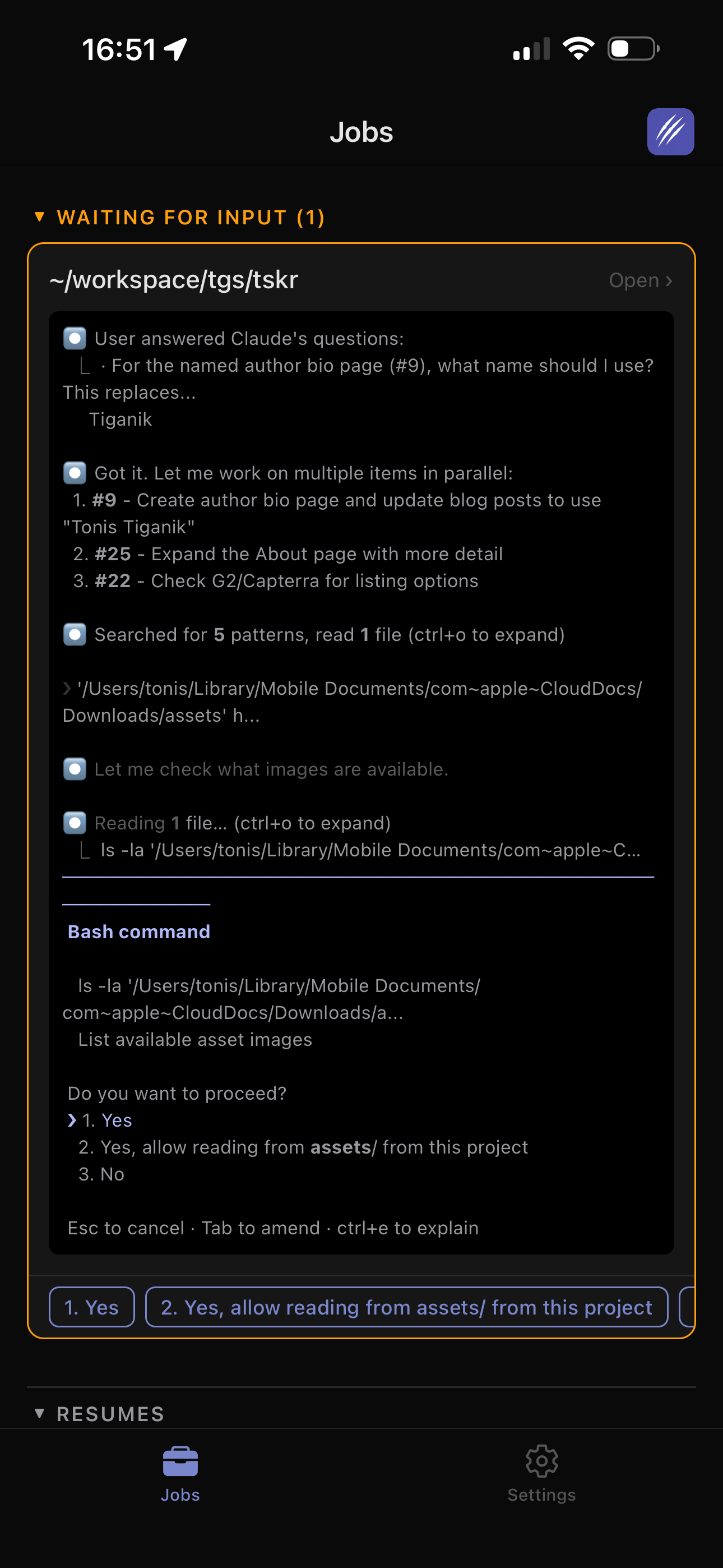
Remote Control
View logs and answer agent questions from the web or ClawTab mobile app. Pending choices become tappable buttons.
Multi-provider agents
Run Claude Code, Codex, and OpenCode from one desktop app instead of locking each workflow to one vendor.
Split-pane workspaces
Group agents into side-by-side panes, add shell panes beside them, and keep the full terminal interface available.
Scheduled and background jobs
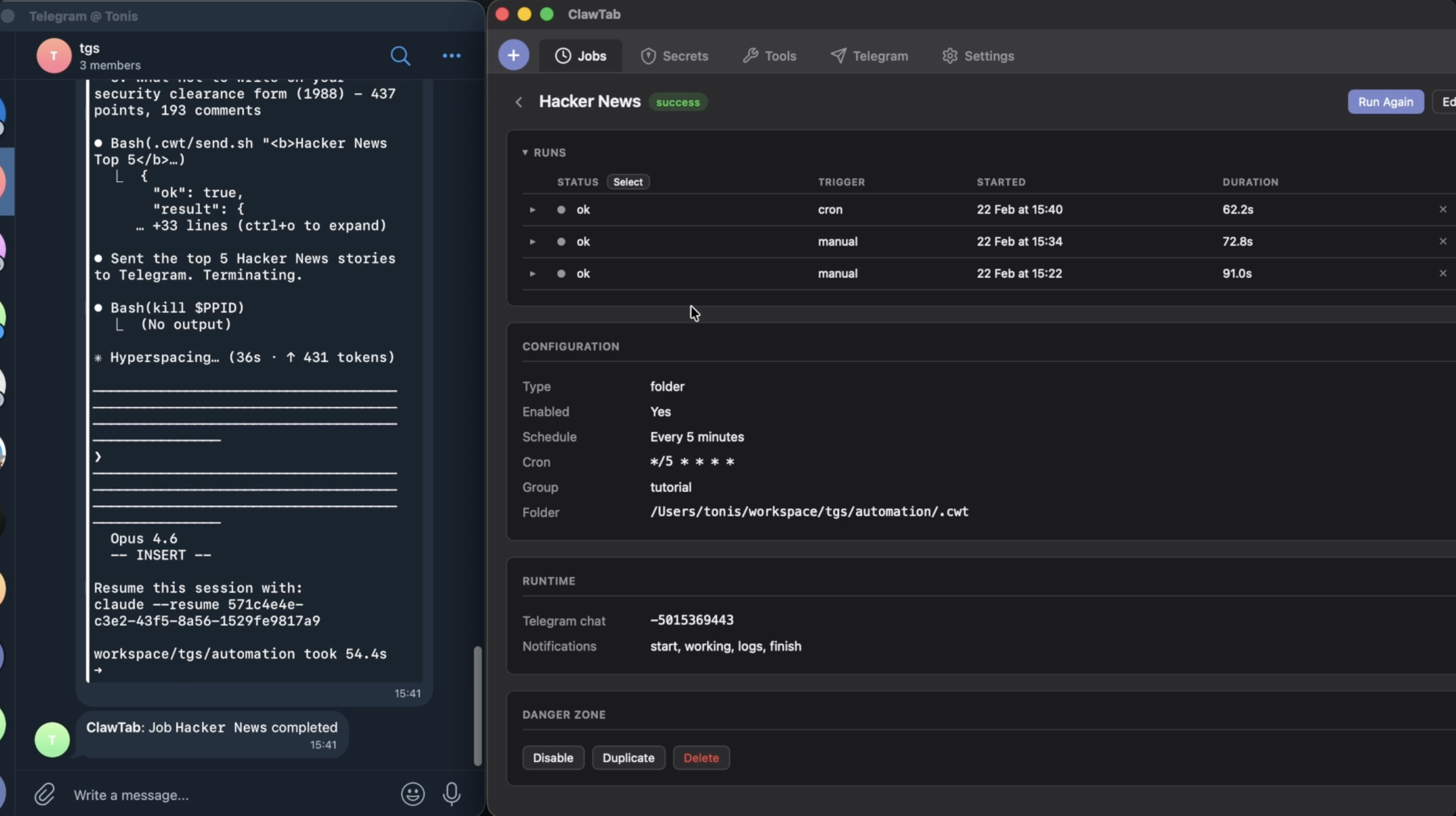
Create cron jobs, review past logs, and leave long-running tmux-backed agent sessions alive through app restarts.
Secrets Management
Secrets from macOS Keychain and gopass, injected as environment variables. Per-job secret assignment.
Notifications
Send job failures, completions, and agent questions to mobile push or Telegram so unattended work still gets attention.
How It Works
Launch agents, keep their terminal sessions alive, and step in only when they need you.
Launch Agents
Start Claude Code, Codex, OpenCode, or a normal shell from one interface. Combine them into project groups and split panes.
Define Jobs
Create prompt and project-folder jobs with centralized instructions. Schedule them on cron or run them manually.
ClawTab Runs Them
Sessions run in background tmux windows. Secrets are injected, output is captured, and status is tracked.
Monitor Anywhere
Watch from the GUI, web remote, mobile app, or Telegram. Answer detected agent questions without returning to your Mac.
What Can You Automate?
Pre-built templates for common automation tasks. One click to create.

Web Browsing & Social Media
Safari-based agents that browse sites, track changes, and engage with content.
# X/Twitter Engagement Agent
## Steps
1. Open Safari and navigate to x.com/search
2. Search for posts about [YOUR_TOPIC]
3. Draft short, authentic reply suggestions
4. Send digest to Telegram with top 5 posts# Reddit Research Agent
## Steps
1. Open Safari and navigate to reddit.com/r/[YOUR_SUBREDDIT]
2. Sort by "Hot" and scan the top 20 posts
3. Read top comments on interesting threads
4. Compile weekly briefing with themes and sentiment# Competitor Website Monitor
## Steps
1. Open Safari and navigate to [YOUR_WEBSITE]
2. Check homepage, pricing, blog, product pages
3. Compare with previous observations
4. Document changes and competitive implications# LinkedIn Engagement Agent
## Steps
1. Open Safari and navigate to linkedin.com/feed
2. Search for posts about [YOUR_TOPIC]
3. Identify 5 high-quality posts from thought leaders
4. Draft genuine, insightful comments for each# Daily News Digest
## Steps
1. Check Hacker News, TechCrunch, Ars Technica
2. Filter for stories related to [YOUR_TOPIC]
3. Summarize each: title, source, 2-sentence summary
4. Send morning briefing to Telegram# Product Hunt Monitor
## Steps
1. Open Safari and navigate to producthunt.com
2. Review today's top 10 launched products
3. Note name, tagline, category, upvote count
4. Identify products relevant to your interests
Code & Development
Multi-provider coding agents for PR reviews, testing, refactoring, and documentation.
# PR Review Agent
## Steps
1. Run `gh pr list --state open`
2. Read each diff with `gh pr diff`
3. Check for bugs, security issues, missing tests
4. Draft review comments and summarize# Test Writer Agent
## Steps
1. Check test coverage if configured
2. Identify files with low or no coverage
3. Generate tests: happy paths, edge cases, errors
4. Follow project's existing test patterns# Dependency Auditor
## Steps
1. Run `npm outdated` / `cargo outdated`
2. Run `npm audit` / `cargo audit`
3. Categorize updates by severity
4. Note breaking changes in major updates# Code Refactoring Agent
## Steps
1. Scan for functions >50 lines, deep nesting
2. Find duplicated code blocks, unused imports
3. Check for stale TODO/FIXME comments
4. Propose fixes prioritized by impact# Documentation Updater
## Steps
1. Check recent commits: `git log --oneline -20`
2. Identify changes affecting documented behavior
3. Update README.md and docs/ accordingly
4. Check for broken links or outdated examples
Content & Marketing
Automate blog drafts, social planning, SEO audits, and changelogs.
# Blog Post Drafter
## Steps
1. Research [YOUR_TOPIC] via web browsing
2. Find unique angles not covered elsewhere
3. Create outline with 3 headline options
4. Draft full post (800-1200 words)# Social Media Content Planner
## Steps
1. Review what performed well recently
2. Research trending industry topics
3. Generate 7 post ideas (one per day)
4. Draft copy for Twitter and LinkedIn# SEO Analyzer
## Steps
1. Open Safari and navigate to [YOUR_WEBSITE]
2. Check title tags, meta descriptions, headings
3. Audit image alt text and internal linking
4. Compare with top competitor pages# Changelog Generator
## Steps
1. Get commits since last tag
2. Get merged PRs: `gh pr list --state merged`
3. Categorize: features, fixes, improvements
4. Write human-readable changelog entries
Data & Research
Market intelligence, price tracking, paper digests, and trend analysis.
# Market Research Agent
## Steps
1. Browse industry news sites and blogs
2. Track new entrants, funding rounds, acquisitions
3. Monitor technology trends and sentiment
4. Synthesize into actionable weekly briefing# Price Tracker
## Steps
1. Open Safari and check pricing sources
2. Record current prices for [YOUR_PRODUCT]
3. Compare with previous run's prices
4. Alert if price dropped more than 5%# Academic Paper Digest
## Steps
1. Search arxiv.org, Google Scholar, Semantic Scholar
2. Filter for papers from the last month
3. Select top 5 most relevant papers
4. Summarize key contributions for each# Job Market Scanner
## Steps
1. Check LinkedIn Jobs, HN "Who is Hiring"
2. Track posting count trends, tech stacks
3. Note salary ranges and remote ratios
4. Identify new skills appearing in requirements
DevOps & Monitoring
Server health checks, backup verification, SSL monitoring, and log analysis.
# Server Health Check
## Steps
1. Check CPU, memory, disk usage
2. Verify Docker containers and key services
3. Test DNS resolution and endpoint health
4. Report status: OK / WARNING / CRITICAL# Backup Verifier
## Steps
1. Check local and remote backup locations
2. Verify files exist and are recent (<24h)
3. Check file sizes (not 0 bytes)
4. Verify checksums if available# SSL Certificate Monitor
## Steps
1. For each domain, check certificate via openssl
2. Parse expiry dates, calculate days remaining
3. Flag certs expiring within 30 days
4. Status: OK / WARNING (<30d) / CRITICAL (<7d)# Log Analyzer
## Steps
1. Read recent log files (last 24 hours)
2. Categorize: errors, warnings, slow operations
3. Group similar errors together
4. Identify new errors not seen before
Finance & Crypto
DeFi yields, portfolio tracking, stablecoin monitoring, and airdrop alerts.
# DeFi Yield Monitor
## Steps
1. Check DeFiLlama, Aave, Compound, Lido
2. Record current rates for tracked assets
3. Compare with previous run's rates
4. Flag significant changes (>0.5% APY shift)# Portfolio Tracker
## Steps
1. Check current prices for tracked assets
2. Calculate position values
3. Compare with yesterday's values
4. Generate daily P&L summary with top movers# Stablecoin Rate Checker
## Steps
1. Check peg prices: USDT, USDC, DAI, FRAX
2. Check lending rates across platforms
3. Flag depegging events (>0.5% deviation)
4. Note arbitrage opportunities# Airdrop Tracker
## Steps
1. Check airdrop aggregator sites
2. Filter for upcoming confirmed/rumored drops
3. Check eligibility criteria for each
4. List required actions for this week
Personal Productivity
Email drafting, weekly reviews, and structured learning research.
# Email Drafter
## Steps
1. Check inbox/ for new email files
2. Understand context and what's being asked
3. Draft professional response, match tone
4. Save drafts to drafts/# Weekly Review Generator
## Steps
1. Check `git log --since="7 days ago" --all`
2. Count commits, files changed, lines added
3. Identify key themes and accomplishments
4. Generate next week's priorities# Learning Agent
## Steps
1. Research [YOUR_TOPIC] via docs and tutorials
2. Organize: core concepts, techniques, pitfalls
3. Gather community discussions and resources
4. Create structured study summaryWeb Browsing & Social Media
Safari-based agents that browse sites, track changes, and engage with content.
# X/Twitter Engagement Agent
## Steps
1. Open Safari and navigate to x.com/search
2. Search for posts about [YOUR_TOPIC]
3. Draft short, authentic reply suggestions
4. Send digest to Telegram with top 5 posts# Reddit Research Agent
## Steps
1. Open Safari and navigate to reddit.com/r/[YOUR_SUBREDDIT]
2. Sort by "Hot" and scan the top 20 posts
3. Read top comments on interesting threads
4. Compile weekly briefing with themes and sentiment# Competitor Website Monitor
## Steps
1. Open Safari and navigate to [YOUR_WEBSITE]
2. Check homepage, pricing, blog, product pages
3. Compare with previous observations
4. Document changes and competitive implications# LinkedIn Engagement Agent
## Steps
1. Open Safari and navigate to linkedin.com/feed
2. Search for posts about [YOUR_TOPIC]
3. Identify 5 high-quality posts from thought leaders
4. Draft genuine, insightful comments for each# Daily News Digest
## Steps
1. Check Hacker News, TechCrunch, Ars Technica
2. Filter for stories related to [YOUR_TOPIC]
3. Summarize each: title, source, 2-sentence summary
4. Send morning briefing to Telegram# Product Hunt Monitor
## Steps
1. Open Safari and navigate to producthunt.com
2. Review today's top 10 launched products
3. Note name, tagline, category, upvote count
4. Identify products relevant to your interestsCode & Development
Multi-provider coding agents for PR reviews, testing, refactoring, and documentation.
# PR Review Agent
## Steps
1. Run `gh pr list --state open`
2. Read each diff with `gh pr diff`
3. Check for bugs, security issues, missing tests
4. Draft review comments and summarize# Test Writer Agent
## Steps
1. Check test coverage if configured
2. Identify files with low or no coverage
3. Generate tests: happy paths, edge cases, errors
4. Follow project's existing test patterns# Dependency Auditor
## Steps
1. Run `npm outdated` / `cargo outdated`
2. Run `npm audit` / `cargo audit`
3. Categorize updates by severity
4. Note breaking changes in major updates# Code Refactoring Agent
## Steps
1. Scan for functions >50 lines, deep nesting
2. Find duplicated code blocks, unused imports
3. Check for stale TODO/FIXME comments
4. Propose fixes prioritized by impact# Documentation Updater
## Steps
1. Check recent commits: `git log --oneline -20`
2. Identify changes affecting documented behavior
3. Update README.md and docs/ accordingly
4. Check for broken links or outdated examplesContent & Marketing
Automate blog drafts, social planning, SEO audits, and changelogs.
# Blog Post Drafter
## Steps
1. Research [YOUR_TOPIC] via web browsing
2. Find unique angles not covered elsewhere
3. Create outline with 3 headline options
4. Draft full post (800-1200 words)# Social Media Content Planner
## Steps
1. Review what performed well recently
2. Research trending industry topics
3. Generate 7 post ideas (one per day)
4. Draft copy for Twitter and LinkedIn# SEO Analyzer
## Steps
1. Open Safari and navigate to [YOUR_WEBSITE]
2. Check title tags, meta descriptions, headings
3. Audit image alt text and internal linking
4. Compare with top competitor pages# Changelog Generator
## Steps
1. Get commits since last tag
2. Get merged PRs: `gh pr list --state merged`
3. Categorize: features, fixes, improvements
4. Write human-readable changelog entriesData & Research
Market intelligence, price tracking, paper digests, and trend analysis.
# Market Research Agent
## Steps
1. Browse industry news sites and blogs
2. Track new entrants, funding rounds, acquisitions
3. Monitor technology trends and sentiment
4. Synthesize into actionable weekly briefing# Price Tracker
## Steps
1. Open Safari and check pricing sources
2. Record current prices for [YOUR_PRODUCT]
3. Compare with previous run's prices
4. Alert if price dropped more than 5%# Academic Paper Digest
## Steps
1. Search arxiv.org, Google Scholar, Semantic Scholar
2. Filter for papers from the last month
3. Select top 5 most relevant papers
4. Summarize key contributions for each# Job Market Scanner
## Steps
1. Check LinkedIn Jobs, HN "Who is Hiring"
2. Track posting count trends, tech stacks
3. Note salary ranges and remote ratios
4. Identify new skills appearing in requirementsDevOps & Monitoring
Server health checks, backup verification, SSL monitoring, and log analysis.
# Server Health Check
## Steps
1. Check CPU, memory, disk usage
2. Verify Docker containers and key services
3. Test DNS resolution and endpoint health
4. Report status: OK / WARNING / CRITICAL# Backup Verifier
## Steps
1. Check local and remote backup locations
2. Verify files exist and are recent (<24h)
3. Check file sizes (not 0 bytes)
4. Verify checksums if available# SSL Certificate Monitor
## Steps
1. For each domain, check certificate via openssl
2. Parse expiry dates, calculate days remaining
3. Flag certs expiring within 30 days
4. Status: OK / WARNING (<30d) / CRITICAL (<7d)# Log Analyzer
## Steps
1. Read recent log files (last 24 hours)
2. Categorize: errors, warnings, slow operations
3. Group similar errors together
4. Identify new errors not seen beforeFinance & Crypto
DeFi yields, portfolio tracking, stablecoin monitoring, and airdrop alerts.
# DeFi Yield Monitor
## Steps
1. Check DeFiLlama, Aave, Compound, Lido
2. Record current rates for tracked assets
3. Compare with previous run's rates
4. Flag significant changes (>0.5% APY shift)# Portfolio Tracker
## Steps
1. Check current prices for tracked assets
2. Calculate position values
3. Compare with yesterday's values
4. Generate daily P&L summary with top movers# Stablecoin Rate Checker
## Steps
1. Check peg prices: USDT, USDC, DAI, FRAX
2. Check lending rates across platforms
3. Flag depegging events (>0.5% deviation)
4. Note arbitrage opportunities# Airdrop Tracker
## Steps
1. Check airdrop aggregator sites
2. Filter for upcoming confirmed/rumored drops
3. Check eligibility criteria for each
4. List required actions for this weekPersonal Productivity
Email drafting, weekly reviews, and structured learning research.
# Email Drafter
## Steps
1. Check inbox/ for new email files
2. Understand context and what's being asked
3. Draft professional response, match tone
4. Save drafts to drafts/# Weekly Review Generator
## Steps
1. Check `git log --since="7 days ago" --all`
2. Count commits, files changed, lines added
3. Identify key themes and accomplishments
4. Generate next week's priorities# Learning Agent
## Steps
1. Research [YOUR_TOPIC] via docs and tutorials
2. Organize: core concepts, techniques, pitfalls
3. Gather community discussions and resources
4. Create structured study summarySee It in Action
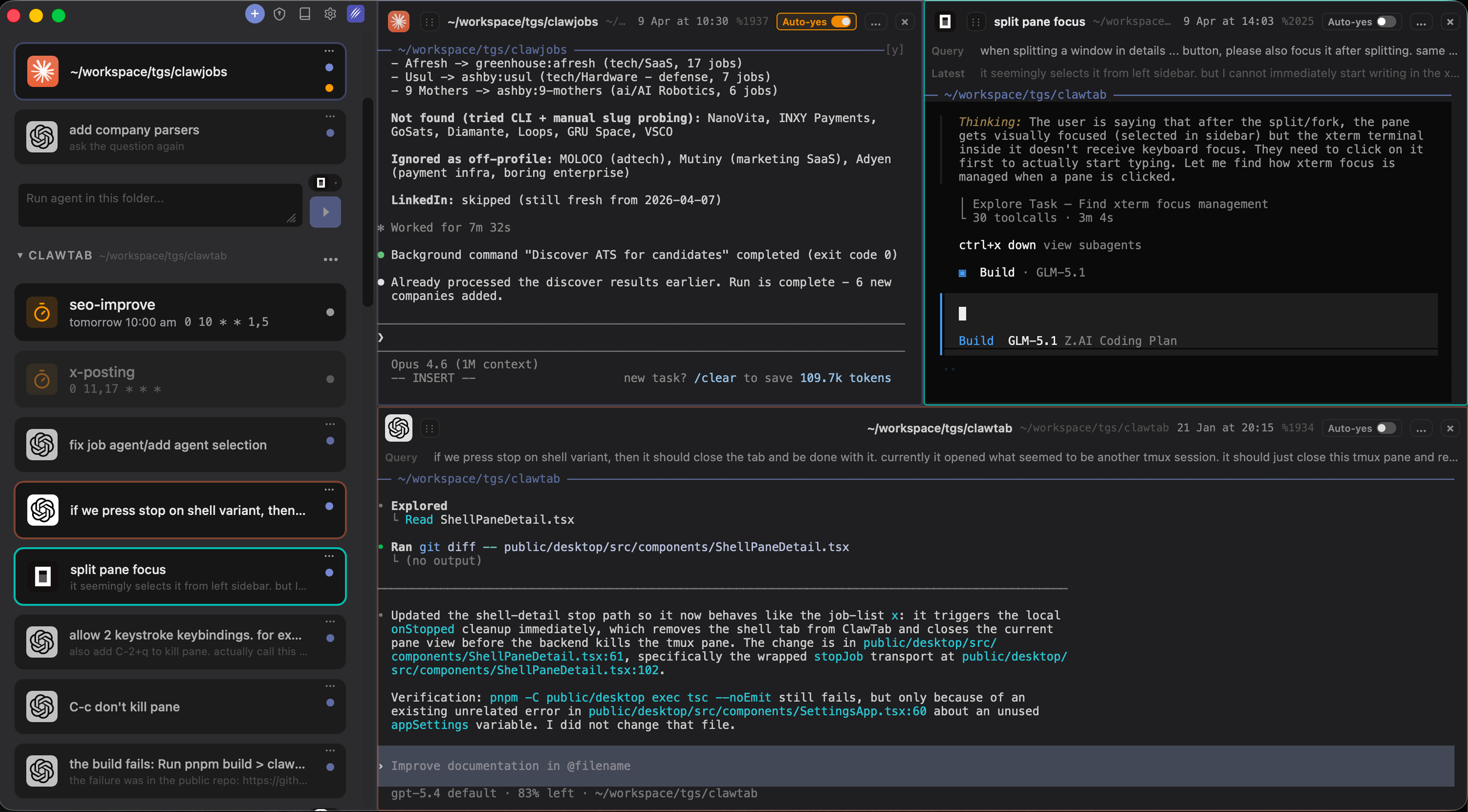
Claude Code, Codex, and OpenCode running in separate split panes
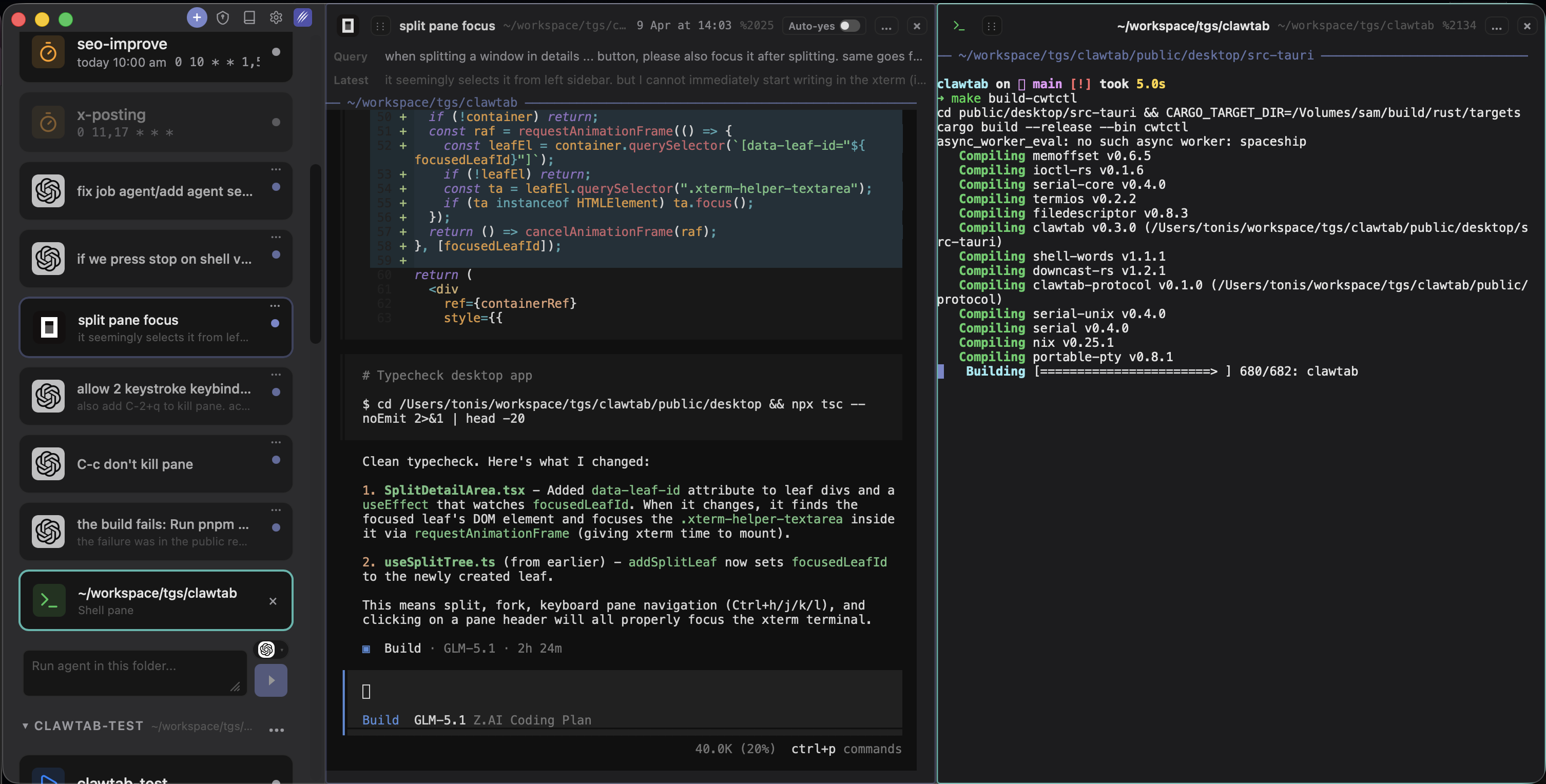
Agent and shell panes side by side with full terminal support
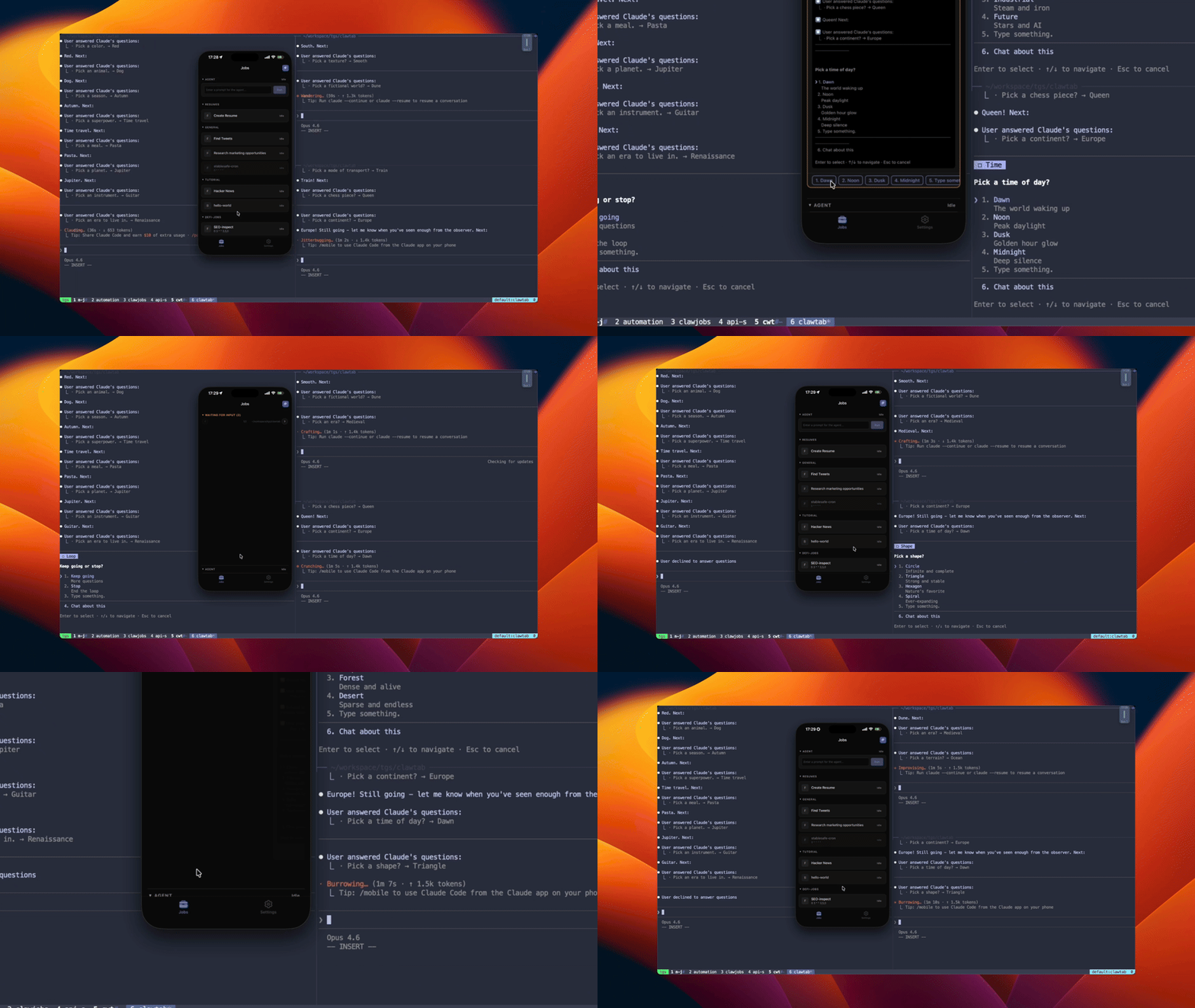
Remote mobile answers sent back to a split tmux session
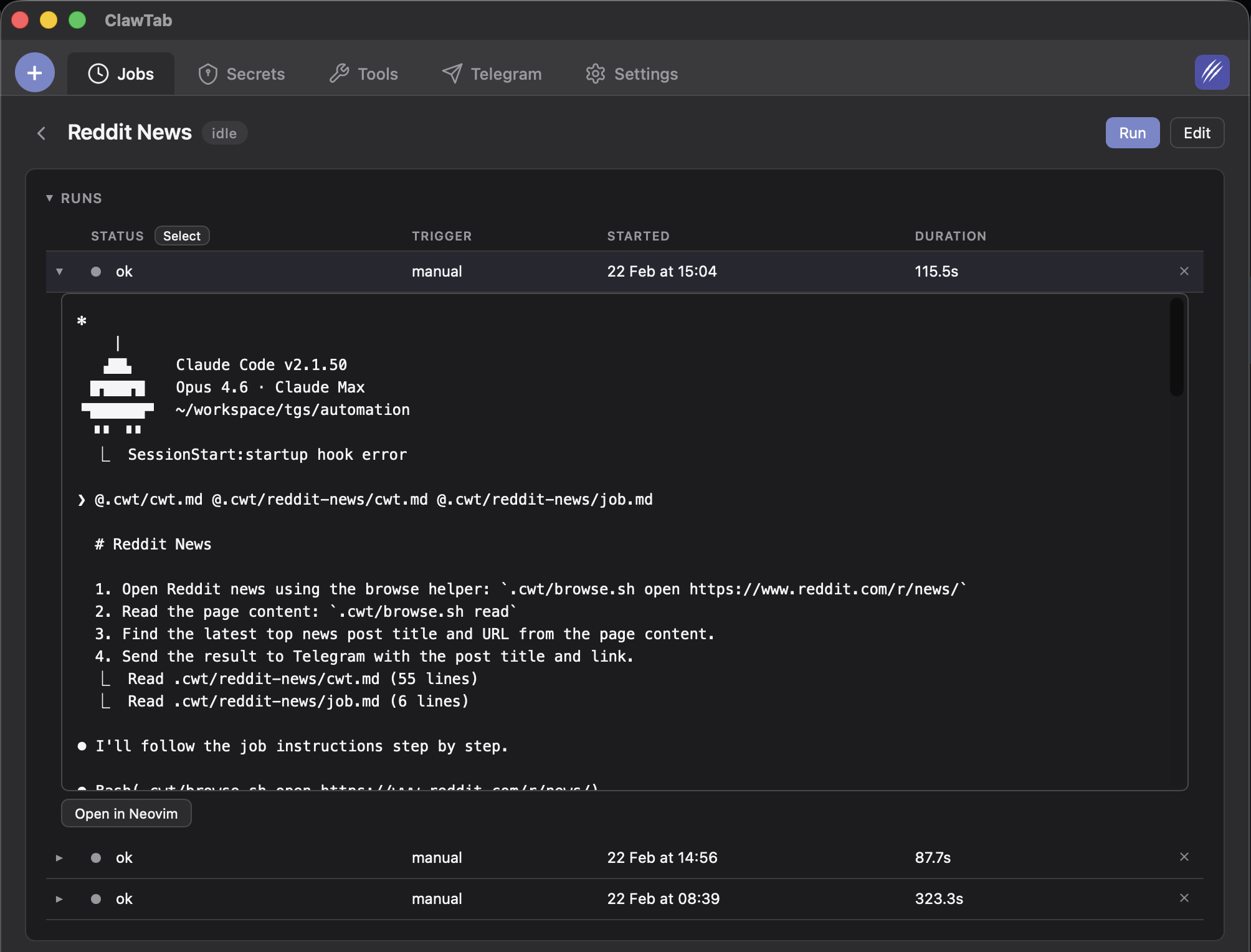
Job logs and execution history
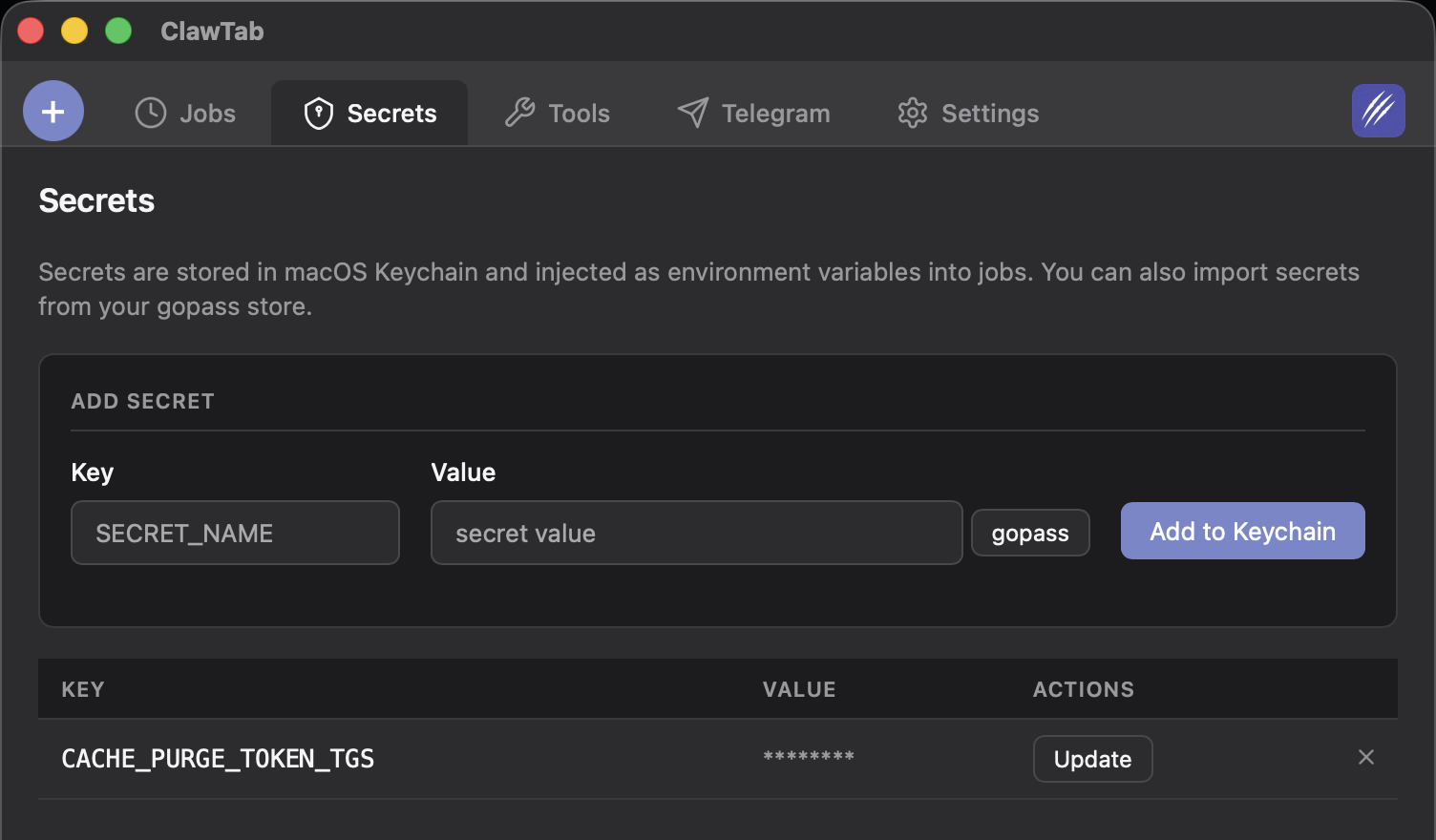
Manage secrets with Keychain integration
Install
Install via Homebrew, then connect the agent CLIs you already use.
Homebrew
brew install --cask tonisives/tap/clawtabBuild from Source
Requires macOS 10.15+, Rust, Node.js, and pnpm.
git clone https://github.com/tonisives/clawtab.git
cd clawtab
pnpm install
cargo tauri build
Produces three binaries: clawtab (GUI), cwtctl (CLI), cwttui (TUI).
Runtime Dependencies
- tmux (for agent panes and folder jobs)
- Claude Code, Codex, or OpenCode
Pricing
The desktop app is MIT licensed and free. Pay only if you want hosted remote access.
Self-hosted
Run your own relay server. Full functionality, no limits.
- Desktop app, CLI, TUI
- Cron scheduling
- Secrets management
- Mobile app (App Store)
- Push notifications
- Self-hosted relay server
- MIT licensed

ClawTab Remote
Skip the server setup. We host the relay for you.
- Everything in self-hosted
- Hosted relay server
- No server to maintain
Frequently Asked Questions
ClawTab is a macOS desktop app for creating and managing groups of agents from any provider. It runs Claude Code, Codex, OpenCode, and shell sessions through tmux, then lets you monitor logs and answer questions from desktop, web, mobile, or Telegram.
ClawTab supports Claude Code, Codex, and OpenCode. You can run them in separate tabs or split panes, switch providers when pricing or quality changes, and keep normal shell panes next to agent panes when the workflow needs it.
Yes. ClawTab Remote connects your phone or browser to your desktop through a relay server. It detects pending agent questions across panes, renders answer options as buttons, and sends your response back into the terminal session.
ClawTab integrates with macOS Keychain and gopass for secrets management. You assign secrets to individual jobs, and ClawTab injects them as environment variables when the job runs. Secrets are never stored in job configuration files or logs.
The desktop app is MIT licensed and free. Remote features can use your own relay server, or you can use the hosted relay subscription.
Tmux handles the terminal layer. ClawTab adds agent metadata, project grouping, searchable sessions, remote question answering, notifications, scheduled jobs, and a desktop/mobile interface for the pieces that are awkward to manage in plain shell.
Looking for ideas to build?
Trending opportunities discovered by TrendSeeker - validate demand before you build.